
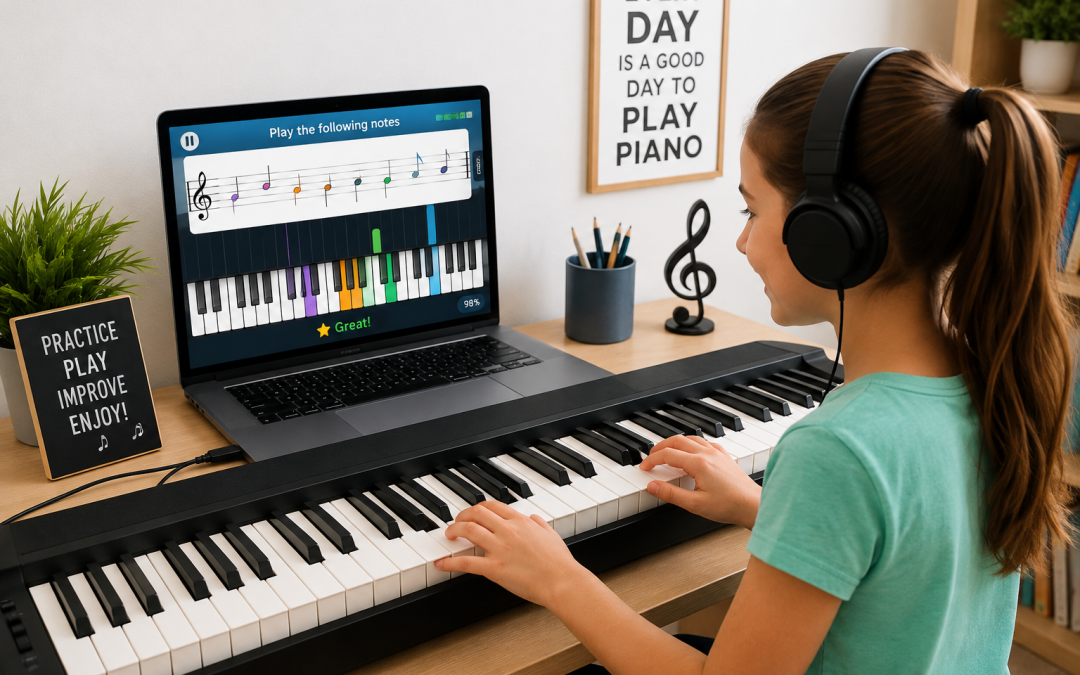
If you want to learn piano online with MIDI keyboard, a connected instrument can turn an ordinary online lesson into an interactive learning experience.
For beginners, that can make an important difference. Instead of wondering whether you played the right key at the right time, an interactive program can use information from your keyboard as part of the lesson itself.
In this guide, we'll explain what a MIDI keyboard is, what you need to connect one, how many keys you need, and how interactive piano lessons can help beginners start playing before traditional music notation feels overwhelming.
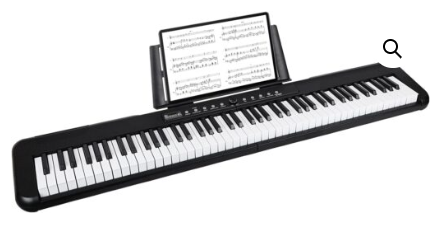
88 Key Digital Piano Semi-Weighted Electronic Keyboard
What Is a MIDI Keyboard?
A MIDI keyboard is a digital keyboard that can communicate with a computer or compatible device.
MIDI stands for Musical Instrument Digital Interface. Instead of treating your keyboard only as an instrument that produces sound, MIDI allows it to communicate information about what you play to compatible software.
For piano students, that opens the door to interactive learning. The software can respond to your playing instead of simply showing you a prerecorded video.
Many modern digital pianos and electronic keyboards have USB connectivity, so you may already own a keyboard capable of working with MIDI-compatible software.
Why Learn Piano Online With a MIDI Keyboard?
There are plenty of ways to learn piano online. You can watch videos, read tutorials, download sheet music, or follow recorded lessons.
Those approaches can be useful, but there is one limitation: the lesson usually doesn't know what you're doing at your keyboard.
A connected MIDI keyboard changes that.
With compatible piano learning software, your keyboard becomes part of the lesson. Instead of passively watching someone else play, you're actively participating.
This can provide several advantages:
- You play on a real keyboard rather than tapping notes on a screen.
- The software can respond to the keys you press.
- You can repeat difficult sections at your own pace.
- Visual cues can help connect what you see with what you play.
- Practice can feel more interactive than watching a conventional video lesson.
- You begin developing familiarity with an actual piano keyboard from the start.
If you're comparing different ways of learning at home, see our guide to online piano lessons with a keyboard.
How to Learn Piano Online With MIDI Keyboard
Do I Need a Special MIDI Keyboard to Learn Piano?
Not necessarily.
Before buying anything new, check the keyboard or digital piano you already own.
Look at the back or side of the instrument for a connection labeled something similar to:
- USB TO HOST
- USB MIDI
- MIDI OUT
The exact connection depends on the keyboard.
Some keyboards connect directly to a computer by USB. Older instruments may use traditional MIDI connectors and require a MIDI-to-USB interface.
If you're shopping for a new instrument, connectivity is worth checking before you buy. Yamaha's guide to buying your first digital keyboard discusses keyboard size, touch sensitivity, connectivity, and other features beginners may want to consider.
How Many Keys Do You Need?
You do not necessarily need an 88-key digital piano to begin learning.
Beginners commonly encounter keyboards with:
- 49 keys
- 61 keys
- 76 keys
- 88 keys
For many beginning lessons, a 61-key keyboard provides plenty of room to get started. An 88-key instrument gives you the complete range of a standard piano and may make sense if you expect to continue into more advanced repertoire.
The most important thing at the beginning is having a keyboard that works reliably with your learning setup and is comfortable enough that you will actually use it.
How to Connect a MIDI Keyboard for Online Piano Lessons
The exact setup depends on your keyboard and computer, but the basic process is usually straightforward.
- Check your keyboard's connection. Look for USB or MIDI ports.
- Connect the keyboard to your computer or compatible device.
- Turn on the keyboard.
- Open your piano learning software.
- Select the keyboard or MIDI device if the program asks you to choose one.
- Play a few keys to confirm that the software recognizes your playing.
Once the connection is working, the keyboard can become part of the interactive lesson.
What Makes MIDI Keyboard Piano Lessons Interactive?
There is a major difference between watching a piano lesson and participating in an interactive one.
Imagine a traditional online lesson.
An instructor demonstrates a group of notes. You watch the screen, look down at your keyboard, try to find the notes, and decide for yourself whether you played them correctly.
Now imagine software that can respond to your keyboard as you play.
That creates a feedback loop:
See it → play it → hear it → get feedback → try again.
That is one reason piano learning software for kids can feel very different from a conventional video lesson.
Learning Piano Through Visual Feedback
One of the hardest parts of beginning piano is that several new skills are often introduced at the same time.
A new student may be expected to:
- Recognize notes on a staff
- Know where those notes are on the keyboard
- Use the correct fingers
- Understand rhythm
- Coordinate both hands
- Listen to what they're playing
That is a lot to process at once.
A visual learning system can simplify the first step by helping students connect something they see on the screen with a physical key on the keyboard.
Once that connection becomes familiar, additional musical concepts can be introduced gradually.
Why Using a Real Keyboard Matters
There are piano apps that allow children to tap virtual keys on a tablet or phone. That can be entertaining, but tapping a picture of a keyboard is not the same experience as playing an actual instrument.
When you learn piano with a MIDI keyboard, you are physically interacting with real keys.
The student begins developing familiarity with:
- The distance between notes
- The repeating pattern of black and white keys
- Finger movement
- Hand position
- Playing more than one note
- Moving around the keyboard
That helps keep the learning experience connected to the instrument itself.
Can Kids Learn Piano With a MIDI Keyboard?
Absolutely. In fact, interactive learning can be especially appealing to children who are comfortable with games and visual technology.
The challenge is making sure the technology leads toward actual music skills rather than becoming a game that happens to contain piano keys.
A useful learning system should gradually help the child understand the relationship between:
- What appears on the screen
- What they play
- What they hear
- Rhythm
- Keyboard geography
- Music notation
That's also why we've built Piano Wizard's piano keyboard game around playing a real instrument rather than simply tapping the screen.
Can Adults Learn This Way Too?
Yes. Interactive piano learning is not limited to children.
A beginner of any age may appreciate being able to:
- Practice privately
- Repeat a lesson without pressure
- Move at an individual pace
- See immediate visual guidance
- Practice whenever it fits their schedule
The technology may look like a game, but the keyboard underneath it is still an instrument.
MIDI Keyboard vs. Traditional Online Piano Videos
Both approaches can be useful, but they solve different problems.
| Online Video Lessons | Interactive MIDI Lessons |
|---|---|
| Watch an instructor demonstrate | Play directly into compatible software |
| Student judges whether notes are correct | Software can respond to played notes |
| Mostly one-way instruction | Interactive learning experience |
| Pause and replay videos | Repeat musical activities directly |
| Works with acoustic or digital piano | Requires compatible MIDI-capable hardware |
You don't necessarily have to choose only one. Video instruction, interactive software, printed music, and even private instruction can complement one another.
How Piano Wizard Uses a MIDI Keyboard
Piano Wizard takes a game-based approach to learning piano, but the goal isn't simply to win a game.
The student plays on a real MIDI-connected piano or keyboard.
At the beginning, visual cues help make the connection between what appears on the screen and the notes played on the instrument.
The process is designed to move through several stages, gradually connecting game play with actual musical understanding and traditional notation.
That makes Piano Wizard especially well suited to families looking for interactive piano lessons rather than lessons that require a child to sit and watch long instructional videos before playing.
From Piano Game to Reading Music
A common concern about game-based learning is whether the student is actually learning piano or simply becoming good at the game.
That's an important distinction.
The objective should be to use the interactive environment as a bridge.
The beginner first makes the connection between visual information and the keyboard. As skills develop, those visual cues can evolve toward music notation.
The destination is not the game.
The destination is playing music.
What Do You Need to Get Started?
A basic setup for learning piano online with a MIDI keyboard can be surprisingly simple.
You will generally need:
- A compatible MIDI keyboard or digital piano
- A computer or supported device
- The appropriate USB or MIDI connection
- Interactive piano learning software
- A comfortable place to sit and practice
You do not need a recording studio, expensive audio equipment, or a professional piano to begin.
Tips for Your First MIDI Piano Lessons
1. Start With Short Sessions
Twenty minutes of focused playing can be more useful than an hour of frustrated practice.
2. Get the Keyboard Comfortable
Place the keyboard at a comfortable height and make sure the screen can be seen without constantly turning or leaning.
3. Don't Rush Through Levels
Repeating a lesson is practice, not failure. Give new skills time to become familiar.
4. Let Beginners Play Early
One advantage of interactive learning is that students can begin experiencing the instrument quickly rather than spending all their time studying theory before making music.
5. Gradually Add Traditional Skills
Games and visual cues are most valuable when they provide a pathway toward broader musical skills.
Frequently Asked Questions
Can I learn piano online with any MIDI keyboard?
Many MIDI-capable keyboards can communicate with piano learning software, but compatibility depends on the keyboard, connection type, device, and software you plan to use. Check the requirements before buying new equipment.
Do I need an 88-key MIDI keyboard?
No. Beginners can start with fewer keys. A 61-key keyboard is common for beginning study, while an 88-key digital piano provides the full piano range.
Do I need weighted keys?
Weighted keys are useful if your goal is to develop a playing experience closer to an acoustic piano, but they are not required simply to begin learning.
Is MIDI the same as audio?
No. MIDI allows musical performance information to be communicated between compatible devices. That is what makes it useful for interactive piano software that needs to recognize what you are playing.
Can I teach myself piano with a MIDI keyboard?
A MIDI keyboard combined with structured lessons can provide a practical way to begin learning independently. Some students eventually add a teacher for technique, interpretation, or more advanced study.
Can children use MIDI piano learning software?
Yes. Interactive and visual learning can make the first steps especially approachable for children, provided the program is designed to develop real keyboard and musical skills rather than simply provide entertainment.
Ready to Learn Piano Online With a MIDI Keyboard?
The biggest advantage of connecting your keyboard to an interactive learning system is simple: you stop being just a viewer.
You start playing.
If you want to learn piano online with a MIDI keyboard, Piano Wizard combines a real keyboard with visual, interactive learning designed to get beginners making music quickly and gradually move them toward reading traditional notation.
Explore Piano Wizard Academy and discover a different way to start learning piano at home.